Product Discovery

We will start with the initial product setup considering a bundle product and some child products and keep the setup very simple and straight forward.

Also With Product Catalog Management, you can define Product Specification Types that are tailored to the unique requirements of your industry and business processes. Each Product Specification Type is associated with a corresponding Product Specification Record Type, which serves as the link between the Product Specification Type and the Record Types defined on the Product object. This association ensures that products are categorized and managed according to the appropriate business context.
In addition, the Product Specification Record Type determines whether a particular product specification is intended for commercial sale or is maintained solely for internal or non-commercial purposes. This distinction helps organizations effectively manage different types of product offerings within the product catalog.
Both Product Specification Types and Product Specification Record Types are optional configuration components within Product Catalog Management.

Also ensure that Manage attributes, products, catalogs, and rules are on the Product Catalog Management app’s home page.
Product Discovery is one of the most important capabilities in Salesforce Revenue Cloud because it helps sales representatives, partners, customers, and AI agents identify the right products, services, bundles, and offers based on customer needs instead of manually searching through thousands of products.
Rather than simply displaying a product catalog, Product Discovery acts as an intelligent recommendation layer that narrows down the available offerings by evaluating business rules, customer context, eligibility, compatibility, pricing, and product relationships.
________________________________________
Why is Product Discovery Needed?
Imagine a telecommunications company that offers:
• Mobile Plans
• Broadband
• TV Packages
• Streaming Services
• IoT Devices
• Insurance
• Accessories
The product catalog may contain over 50,000 products.
If a sales representative searches manually, they might:
• Select incompatible products.
• Miss cross-sell opportunities.
• Offer unavailable products.
• Choose incorrect pricing.
• Increase quote creation time.
Product Discovery solves these challenges by dynamically identifying only the products that are relevant to the customer's requirements.
Challenges Without Product Discovery

Product Discovery with Revenue Cloud

Order of Execution for Product Discovery

How to set up product discovery in revenue cloud?
To configure product discovery settings first we must
1. Create the Context Definition
2. Create Qualification Rules
3. Create Pricing pro
Now what is Context and Context Definition?
Context Definition is used to define the business context in which a particular product, pricing, qualification, configuration, or commercial rule should be evaluated. It provides the framework for determining which contextual information should be available to a Revenue Cloud process and how that information is interpreted when a rule is executed.
In simple terms:

For example, the same product may be available to one customer but not another, or the same product may have different pricing depending on the customer's country, segment, channel, currency, or existing relationship. Context Definition provides the contextual information needed to make those decisions.
Why do we need Context Definition?
Consider an enterprise selling cloud services.
A product called:
Enterprise Cloud Platform
may have different commercial behavior depending on:
• Customer type
• Customer country
• Sales channel
• Currency
• Existing products
• Contract status
• Customer segment
• Geographic market
For example:

Revenue Cloud therefore needs to understand:

Technical Architecture

Example: -
Suppose a company sells laptops.
The catalog contains:

The company has a rule:

Revenue Cloud needs contextual information such as:

The conceptual processing becomes:

This becomes particularly important when using Product Discovery. Imagine a catalog containing: 20,000 products. A customer searches for: "I need a secure cloud solution for 500 employees."
Revenue Cloud can use contextual information such as:
Customer

Instead of presenting 20,000 products, the experience can narrow the catalog to products relevant to the customer and transaction context.
After creating the context definition, the qualification rules extend the values provided from the context definition for the actual evaluation.

Standard Context Definitions
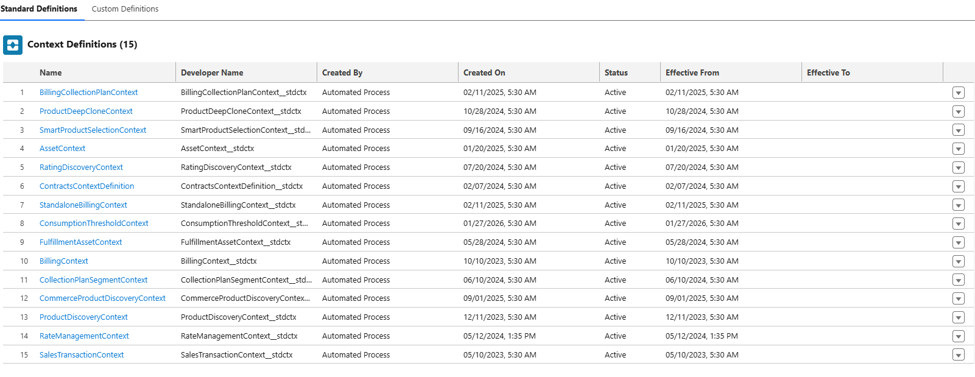
Now for example we have a scenario where we need to have a list of Cars being shown to a Customer whose customer type is Military then we will start to define the Context here and then create a separate Product Discovery Context.
We will start with New Context Definition and Extend the Product Discovery context, so as to make sure that whenever Salesforce makes changes in the Standard Product Discovery context then our Custom Definition also reflects the changes automatically.

Currently it is showing Activated, but initially it will be not activated, and you can Edit the Structure to add the relevant Nodes. Consider Nodes to be the sObject that we are including in the Context. As a rule the Parent Node will be Account and we have to establish the relation from there as Sibling or child Node.

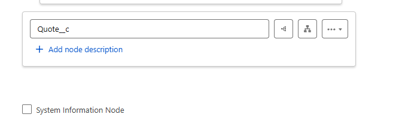
In our scenario we are adding the Consumer Type at the Quote Level so we are adding the Quote as a Node here. And then Add the consumer Type as an Attribute which will be the Input or Output or both along with their Data Type for the Context.

And then we will assign the appropriate Tags to the Node and Attributes.


After this we will map the data under the ProductDiscoveryMapping and Edit the Sobject and the Attributes mapping and select the relevant sObject and the Fields.


Before Activating ensure the Context, Tags has been generated and then Click Activate. Next, we will select this Product Discovery Details in the Discovery settings.

In the next articles we will cover categories, attributes in details.


Comments